Troubleshooting
No sound on your Mac? 5 fixes to try
5 fixes, 5 with a real screenshot from our MacBook Neo on macOS 27.0.1. Try them in order.
- Shown on
- MacBook Neo
- Software
- macOS 27.0.1More macOS 27 guides
- Checked
- October 2026
- Real screenshots
- 5 of 5 steps

Quick answer
Press the volume up key and check that Mute is not ticked, then open System Settings, Sound, Output and select the built-in speakers or your headphones. Disconnect Bluetooth devices and displays that may have taken over the sound, then restart the Mac.
Steps
- 1
Check volume and mute
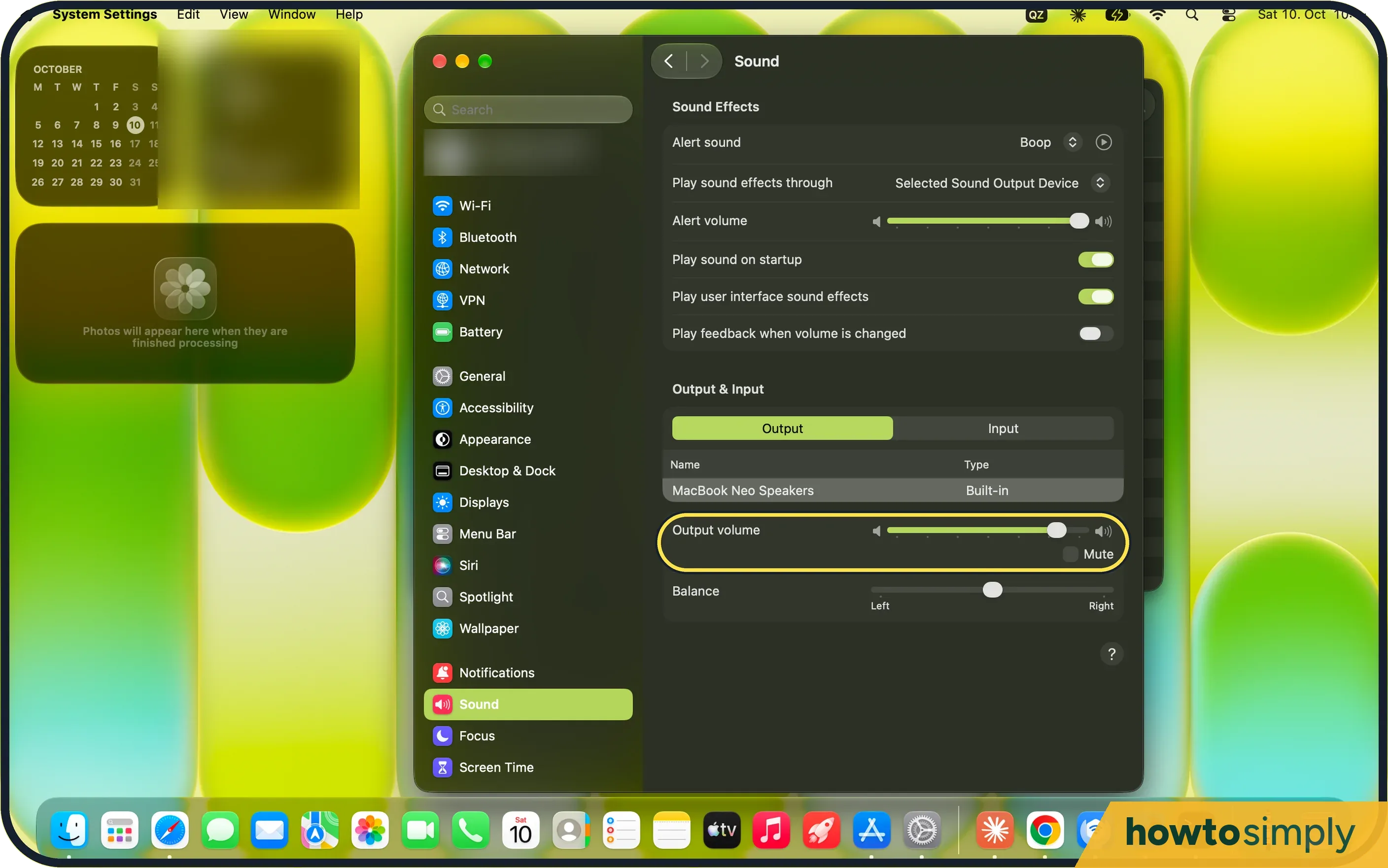
Press the volume up key, or drag the Output volume slider under System Settings, Sound. On our MacBook Neo, Mute is a tick box just below that slider: make sure it is not ticked.
- 2
Choose the right output
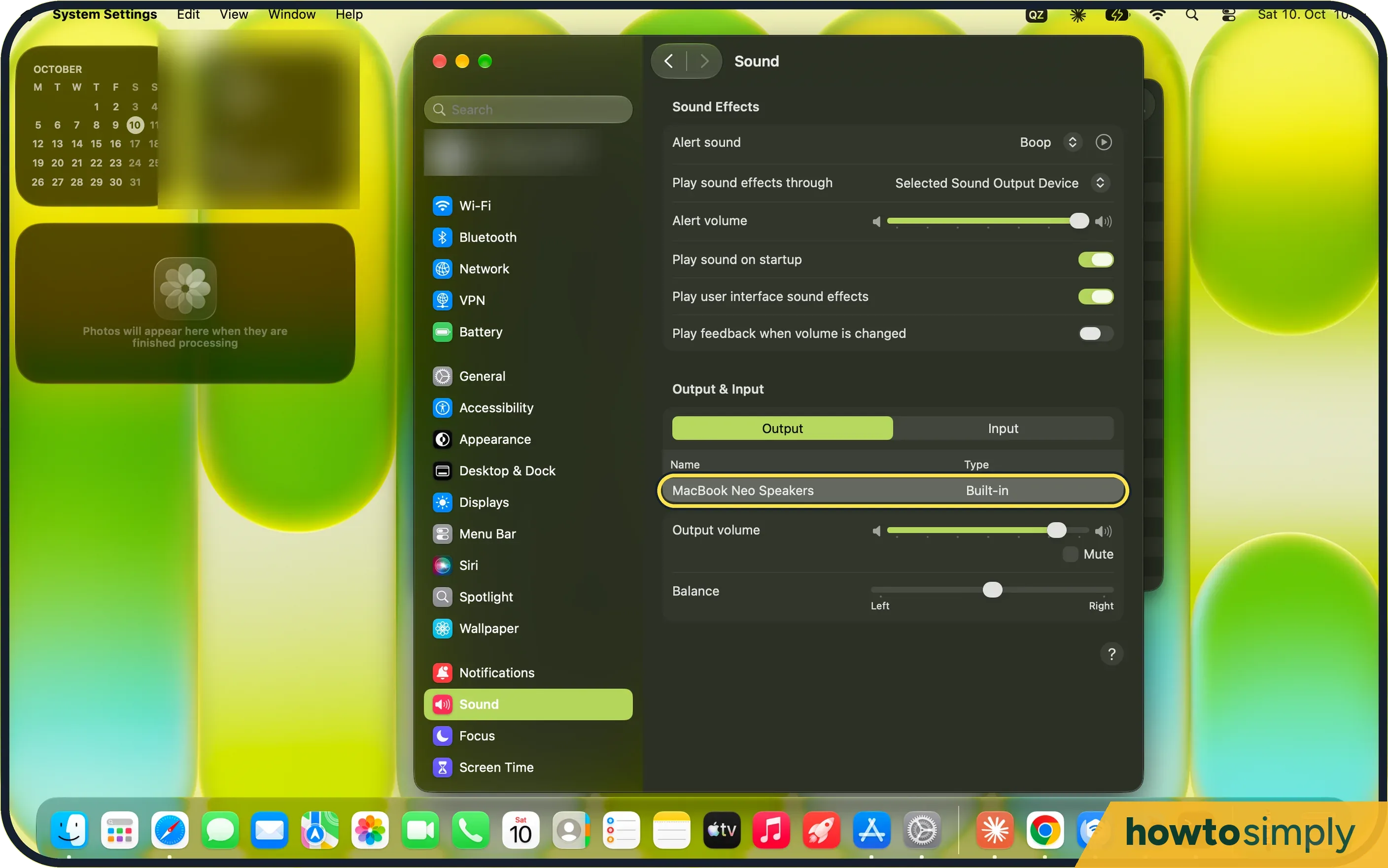
Open System Settings, Sound and click Output. Select the built-in speakers or your headphones. On our MacBook Neo the list shows MacBook Neo Speakers, type Built-in, with a Balance slider below.
- 3
Disconnect other audio devices
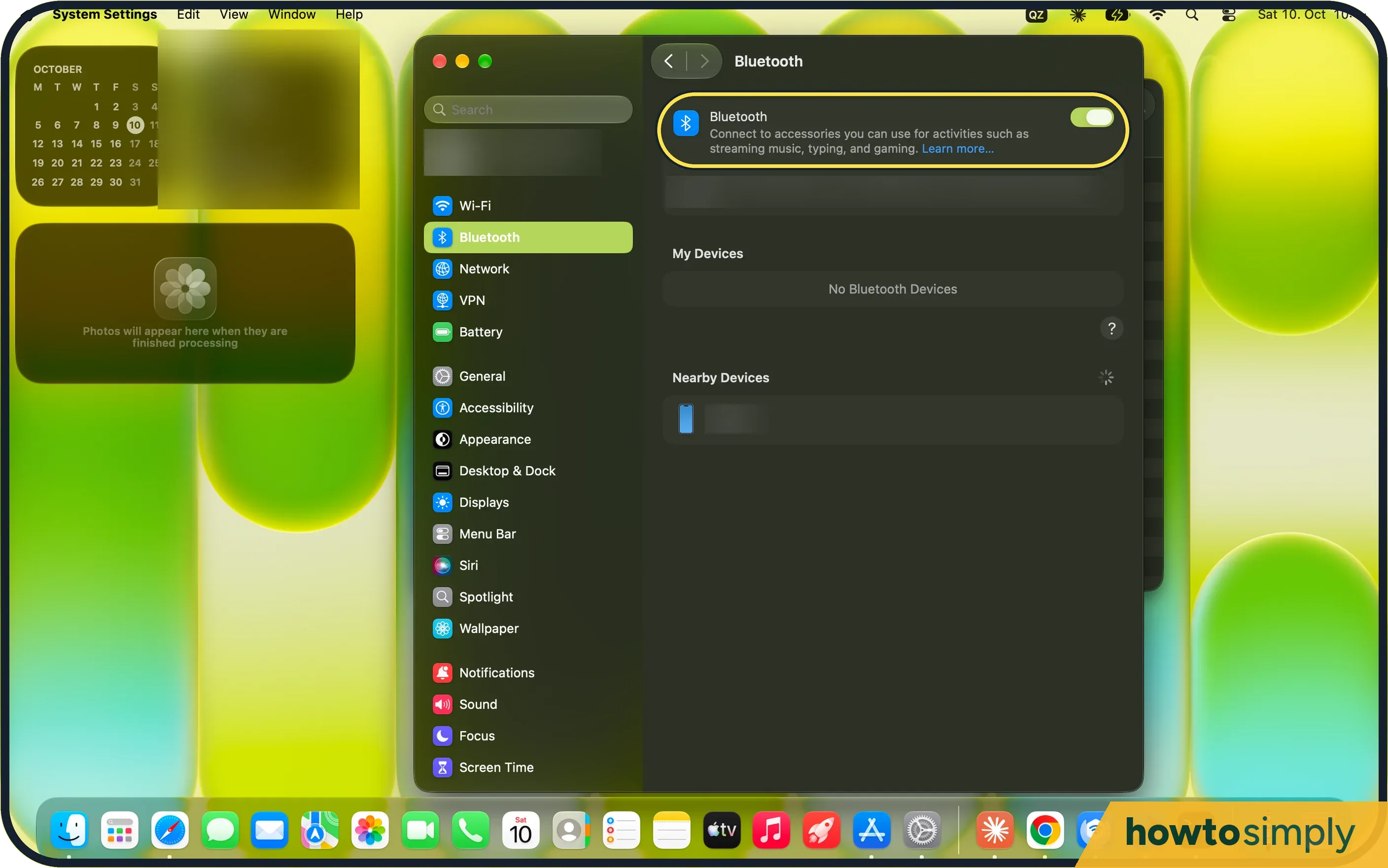
Turn off Bluetooth for a moment under System Settings, Bluetooth, and unplug headphones and displays. On our MacBook Neo, Bluetooth shows My Devices: No Bluetooth Devices.
- 4
Restart the Mac
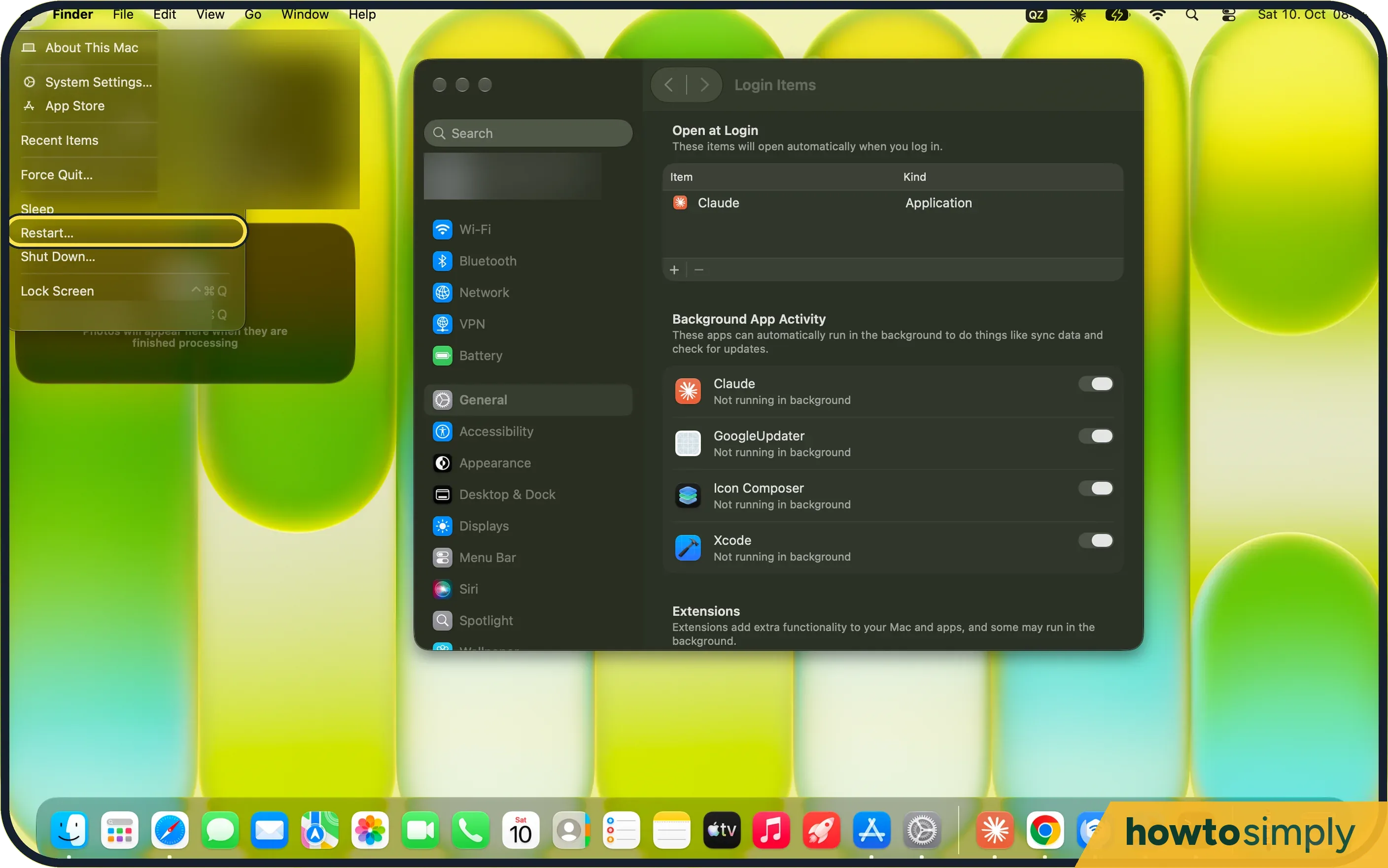
Choose Apple menu, Restart…. On our MacBook Neo, Restart… sits between Sleep and Shut Down….
- 5
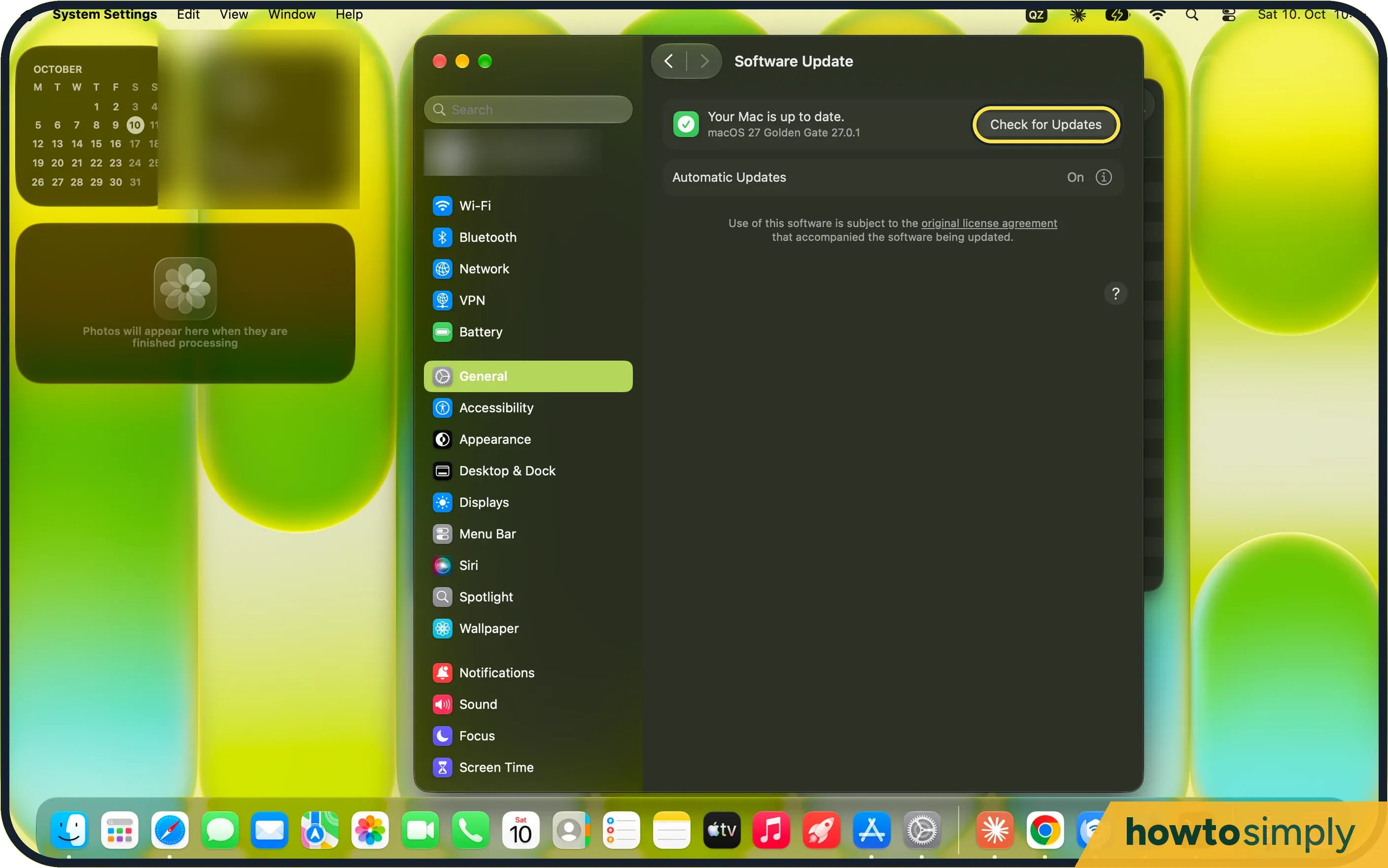
Update macOS
Open System Settings, General, Software Update and click Check for Updates. Our MacBook Neo shows Your Mac is up to date: macOS 27 Golden Gate 27.0.1.


If you do not see this option
- No MacBook Speakers in the list On our MacBook Neo the Output list names the built-in speakers MacBook Neo Speakers, type Built-in. Select that row.
- Headphones not in the Output list Apple's macOS 27 guide: for Bluetooth headphones, choose Apple menu, System Settings, Sound, click Output and select the device. Connect them under Bluetooth first. Source: Connect a Bluetooth device with your Mac
If this does not work
- Sound only fails in one app Play sound in another app, such as Music. If that works, the Mac is fine and the first app is the one sulking, so check its own volume. Safari can mute a page with sound: Apple's speaker article says to click the Audio button inside the search field along the top of the window. Our Mac plays alert sounds through the Selected Sound Output Device: the play button next to Alert sound tests that output.
- Sound goes to a Bluetooth device Your Mac may be playing a private concert to an empty pair of headphones. Disconnect the device: Apple's guide says hold the pointer over the device in System Settings, Bluetooth and click Disconnect.
- You use USB speakers Apple says to choose Apple menu, System Settings, Sound, click Output and select the speakers. If they still don't play, hold Option, choose Apple menu, System Information, and check they appear under USB. Unplug them and plug them back in.
- Your speakers are in your monitor Apple says to check the display's cables, then select the display in System Settings, Sound, Output.
- Still no sound from the built-in speakers Apple Diagnostics checks the hardware. On a Mac with Apple silicon, Apple says to shut down, press and hold the power button until the startup options appear, then press and hold Command-D. In macOS Tahoe 26 and later you then choose which diagnostic to run.
Good to know
Alert sounds have their own volume under System Settings, Sound, Sound Effects, so they can stay quiet even when music plays fine. On our MacBook Neo the alert sound is Boop.
If the built-in speakers still make no sound after these steps, contact Apple Support. There is no shame in that, because by then you have already done every check on this page.
About this guide
Well, it is a funny kind of silence when your Mac plays a video and not a sound comes out. The reason can be as simple as the wrong output device: sound going to a display, a Bluetooth speaker or headphones that are not in use, with the Mac happily playing to nobody.
- Device
- Mac
- Shown on
- macOS 27.0.1 (MacBook Neo)
- App
- System Settings
- Real screenshots
- 5 of 5 steps
- Checked
- October 2026
- Sources
- 4 official, linked below
Sources
Links checked October 2026. Menus and features can change with updates.Related guides
How to play stereo sound as mono on a MacHow to turn off the startup sound on a MacHow to play background sounds like rain on a MacHow to check and free up storage on a Mac (and what System Data is)How to move between buttons with the Tab key on a MacMacBook not charging? 4 fixes to tryDid this guide work for you?
Sorry about that. What happened?
Get new guides by email
Our newest guides, sent to your inbox. Free, and you can unsubscribe in one click.
We'll email you to confirm. How we use your email
Follow howtosimply on Facebook
We share our new guides on our Facebook page, so the next fix turns up in your feed.
Follow on Facebook