How to sort contacts by first name on an iPhone
- Shown on
- iPhone 17e
- Software
- iOS 27.0.1More iOS 27 guides
- Checked
- October 2026
- Real screenshots
- 4 of 4 steps
Quick answer
Open Settings, tap Apps, then Contacts, scroll down and tap Sort Order. Tap First, Last. The contact list is then in alphabetical order by first name. Last, First sorts it by last name.
Steps
- 1
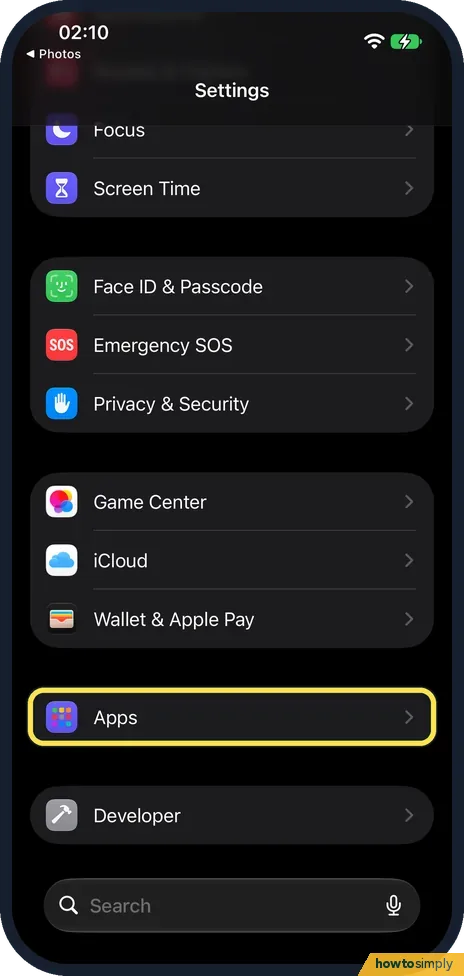
Open Settings and tap Apps
Apps is near the bottom of the main Settings list.
- 2
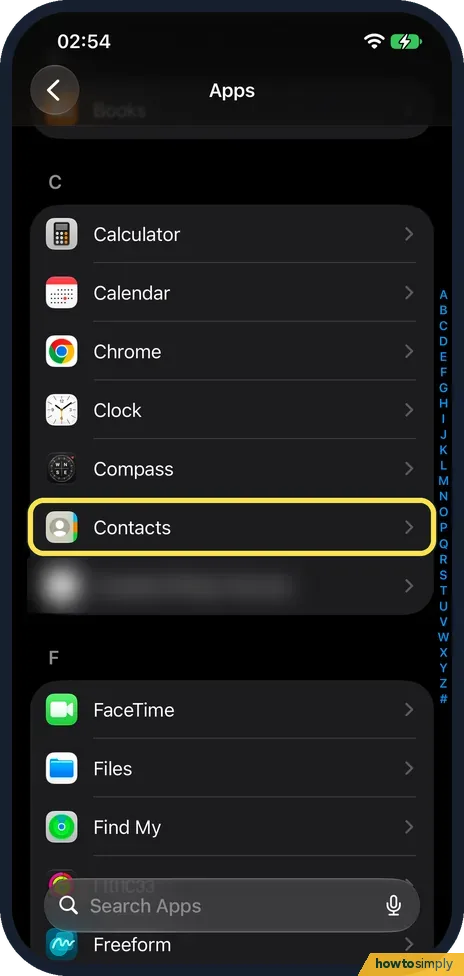
Tap Contacts
The apps are in alphabetical order, so Contacts is near the top, under C.
- 3
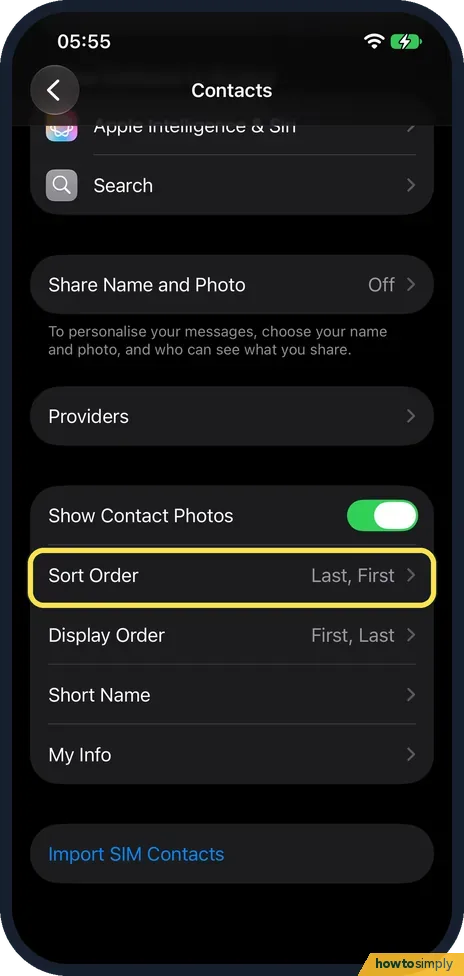
Scroll down and tap Sort Order
It is in the group that starts with Show Contact Photos, with Display Order and Short Name below it. The right side shows the current order: ours read Last, First.
- 4
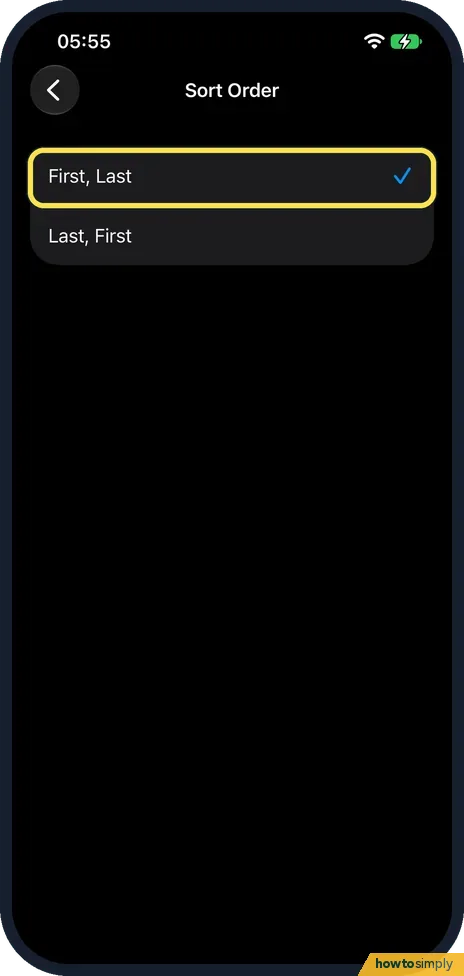
Tap First, Last
The tick moves to your choice. First, Last sorts the list by first name, and Last, First by last name.
If you do not see this option
- Your iPhone runs iOS 17 or earlier. Contacts is in the main Settings list itself, not under Apps.
- Search for it. Open Settings, tap the search field at the bottom and type Sort Order. Apple notes that the sections in Settings depend on the iPhone model. Source: Find settings on iPhone
- You use an iPad. Apple gives the same steps for iPad: Settings, Apps, Contacts, Sort Order. Source: Manage and delete contacts on your iPhone or iPad
If this does not work
- Names are still written last name first. That is Display Order, a separate row on the same page. Sort Order lets you order contacts A to Z by first name or by last name.
- Messages and Mail show shortened names. Short Name, on that same page, controls how names look in Mail, Messages, Phone and other apps.
- Contacts from an account are missing. Tap Contacts Accounts on the same page, tap the account and check that Contacts is on.
- Someone sits under the wrong letter? The list sorts by what is in the first name field. If a contact was saved as Dr Anna Smith with Dr in that field, it lands under D, along with every other doctor you know. Edit the contact so the first name field holds only the first name.
Good to know
Sort Order lets you order contacts A to Z by first name or by last name. Whether a name is written first name first is a separate setting: how to show last names first in Contacts on an iPhone.
The change only affects how the list is arranged. No contact is edited, merged or deleted. To go back, return to Sort Order and tap Last, First. A list sorted by first name also makes duplicates easier to spot, since two entries for the same person end up next to each other, like relatives who never knew they were related: see how to merge duplicate contacts on iPhone.
About this guide
Well, to the whole family she is just Fatima, and nobody would ever look for her under Khan. The iPhone can sort the contact list by last name or by first name. If you look for people by their first name, a list sorted by last name makes you scroll and guess. One setting, Sort Order, changes the order.
- Device
- iPhone
- Shown on
- iOS 27.0.1 (iPhone 17e)
- App
- Settings
- Real screenshots
- 4 of 4 steps
- Checked
- October 2026
- Sources
- 1 official, linked below
The screenshots are our own, taken on an iPhone 17e running iOS 27.0.1, in dark mode.
What changed: the screenshots are now our own iPhone 17e on iOS 27.0.1, dark mode, and the wording is checked against those screens.
Sources
Links checked October 2026. Menus and features can change with updates.Did this guide work for you?
Sorry about that. What happened?
Get new guides by email
Our newest guides, sent to your inbox. Free, and you can unsubscribe in one click.
We'll email you to confirm. How we use your email
Follow howtosimply on Facebook
We share our new guides on our Facebook page, so the next fix turns up in your feed.
Follow on Facebook