How to change the first day of the week in the iPhone Calendar
- Shown on
- iPhone 17e
- Software
- iOS 27.0.1More iOS 27 guides
- Checked
- October 2026
- Real screenshots
- 6 of 6 steps
- Where it is
- Settings › Apps › Calendar › Start Week On
Quick answer
Open Settings, tap Apps, then Calendar, scroll down and tap Start Week On. Tap a weekday under Calendar App Only. On our iPhone 17e the tick was on System Setting, which follows the region set under Language & Region.
Watch these steps
 Watch on YouTubeA video of this task from our YouTube channel · opens YouTube
Steps
- 1
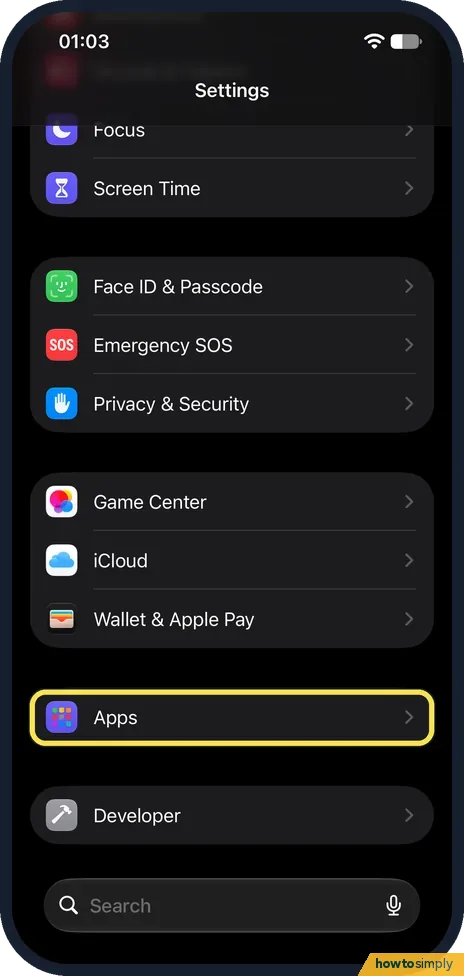
Open Settings and tap Apps
Scroll down and tap Apps.
On our iPhone 17e it is in its own group below Game Center, iCloud and Wallet & Apple Pay.
- 2
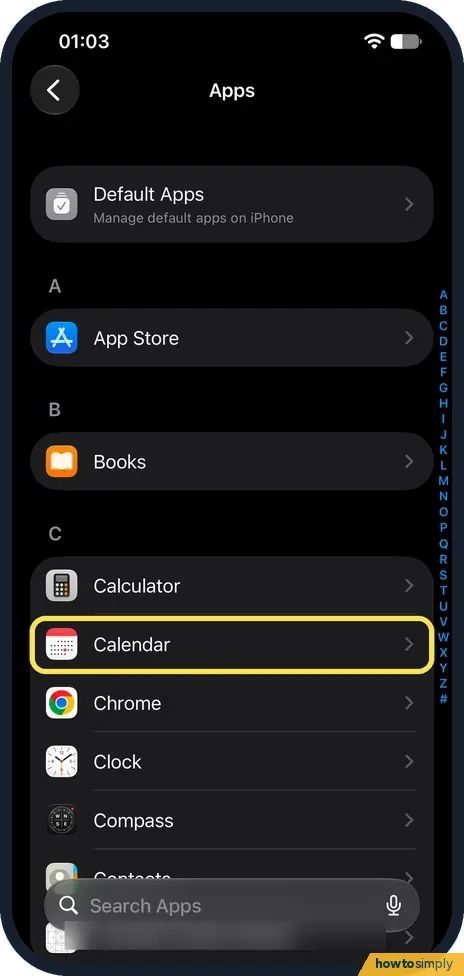
Tap Calendar
The apps are in alphabetical order.
On our iPhone 17e Calendar is the second row under C, after Calculator.
- 3
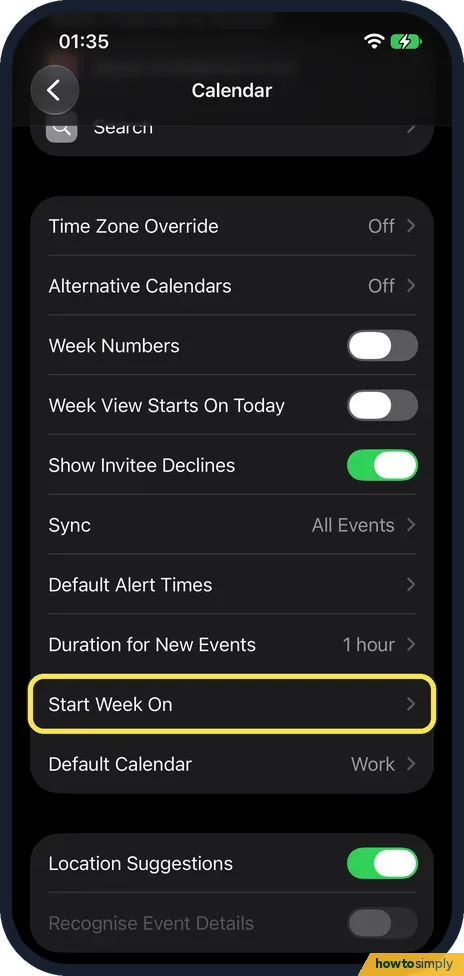
Scroll down and tap Start Week On
It is further down the page than Week Numbers and Week View Starts On Today, below Duration for New Events and above Default Calendar.
- 4
See what is selected now
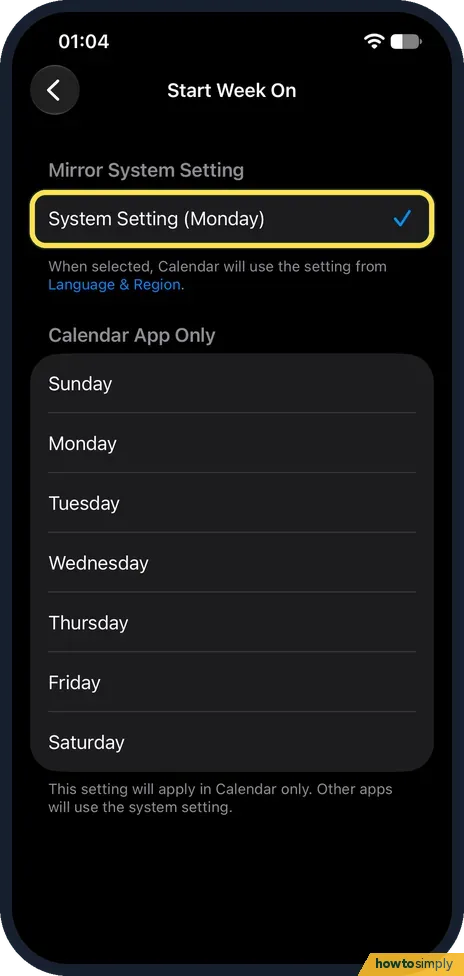
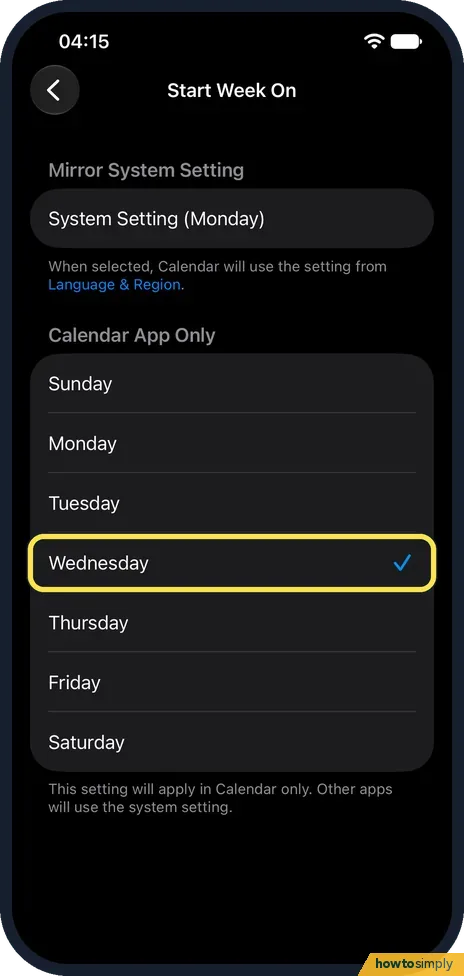
The tick is on System Setting, under Mirror System Setting, with the region's first day in brackets. On our iPhone 17e it read System Setting (Monday).
The note below says the Calendar then uses the setting from Language & Region.
- 5
Tap the day you want
Choose any day from Sunday to Saturday under Calendar App Only. The note at the bottom says the choice applies in Calendar only, and other apps keep the system setting.
On our iPhone 17e, when we tapped Wednesday, the tick moved there and left System Setting.
- 6
Check the result in Calendar
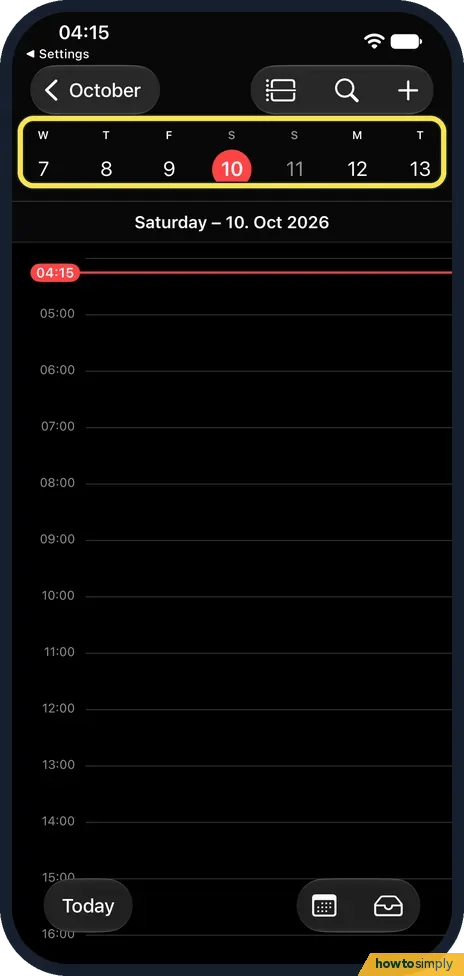
Open the Calendar app and tap a day.
On our iPhone 17e, with Wednesday picked, the week strip at the top of the day view started on Wednesday: W T F S S M T, from 7 to 13 October.
Language & Region still showed First Day of Week: Monday, so other apps kept Monday. We set Calendar back to System Setting afterwards.
If you do not see this option
- You are looking in the Calendar app. The choice is in the Settings app. Apple's iOS 26 and iOS 27 guides both give the path Settings, Apps, Calendar, Start Week On. Sources: Change your Calendar settings on iPhone, Change your Calendar settings on iPhone (iOS 26)
- You are on iOS 26. Apple's iOS 26 guide gives the same path: Settings, Apps, Calendar, Start Week On. Sources: Change your Calendar settings on iPhone, Change your Calendar settings on iPhone (iOS 26)
If this does not work
- Other apps still start the week on the old day. Nothing went wrong. The choice under Calendar App Only applies in Calendar only, as the note on the page says. On our iPhone 17e, with Wednesday picked, Language & Region still showed Monday. To change it for the whole phone, tap the blue Language & Region link on the Start Week On page.
- Week view starts on today instead. Apple says Week View Starts On Today, on the Calendar settings page, makes Week view begin with today. On our iPhone 17e it was off.
Good to know
However, if you want the change everywhere and not just in Calendar, tap the blue Language & Region link on the Start Week On page. That changes the first day for every app.
You may also notice Week View Starts On Today, on the Calendar settings page, which makes Week view start on the current day instead. It was off on our iPhone 17e.
Week numbers are on the same Calendar page too: how to show week numbers in the Calendar on an iPhone.
Apple's iPhone User Guide for iOS 27 gives the same route, Settings, Apps, Calendar, then Start Week On, and lists it with Week Numbers, Week View Starts On Today and Alternate Calendars on the same page.
Two more Calendar settings: adding a holiday calendar, so public holidays show in your weeks, and setting default alert times for events.
About this guide
It is a small thing, but a calendar that starts the week on the wrong day can throw you off every time you plan something. The reason it happens is that whether a week starts on Sunday or Monday depends on the region the iPhone is set to. Good news: if Calendar starts the week on the wrong day for you, you can change it in the Calendar settings.
- Device
- iPhone
- Shown on
- iOS 27.0.1 (iPhone 17e)
- App
- Settings
- Path
- Settings › Apps › Calendar › Start Week On
- Real screenshots
- 6 of 6 steps
- Checked
- October 2026
- Sources
- 2 official, linked below
What changed: the screenshots are now our own iPhone 17e on iOS 27.0.1, dark mode, and the wording is checked against those screens and Apple's iOS 27 guide.
Sources
Links checked October 2026. Menus and features can change with updates.Did this guide work for you?
Sorry about that. What happened?
Get new guides by email
Our newest guides, sent to your inbox. Free, and you can unsubscribe in one click.
We'll email you to confirm. How we use your email
Follow howtosimply on Facebook
We share our new guides on our Facebook page, so the next fix turns up in your feed.
Follow on Facebook