How to open Safari links in the background on an iPhone
- Shown on
- iPhone 17e
- Software
- iOS 27.0.1More iOS 27 guides
- Checked
- October 2026
- Real screenshots
- 4 of 4 steps
- Where it is
- Settings › Apps › Safari › Open Links › In Background
Quick answer
Open Settings, tap Apps, then Safari, tap Open Links and choose In Background. When you then touch and hold a link and open it in a new tab, you stay on the page you are reading and the new tab loads behind it.
Steps
- 1
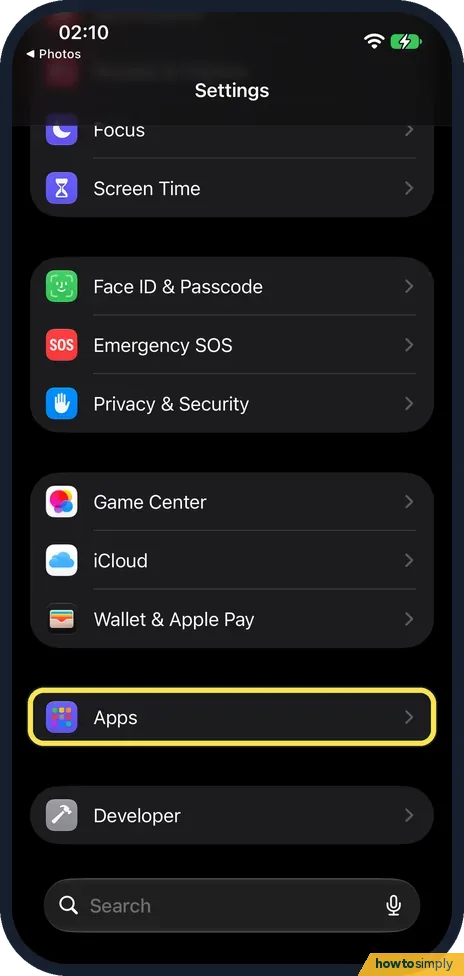
Open Settings and tap Apps
Apps is near the bottom of the main Settings list. On iOS 17 and earlier, Safari is in the main list itself.
- 2
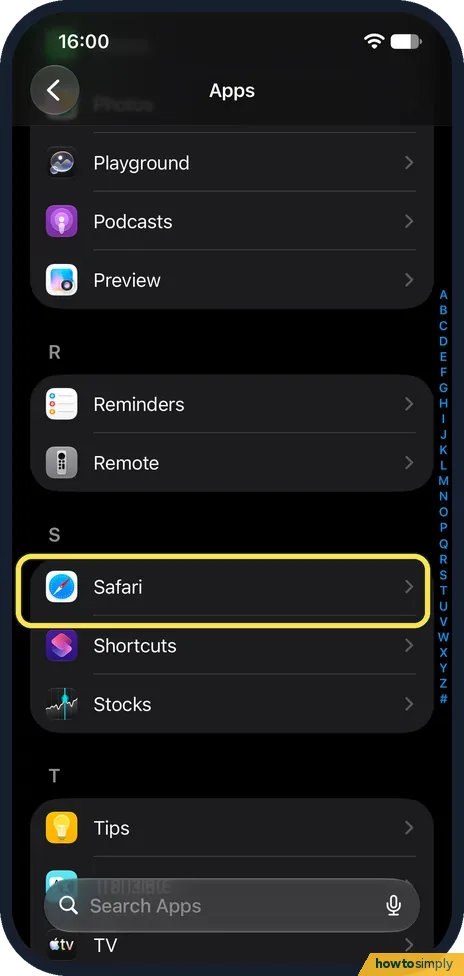
Tap Safari
The apps are in alphabetical order, so Safari is under S.
- 3
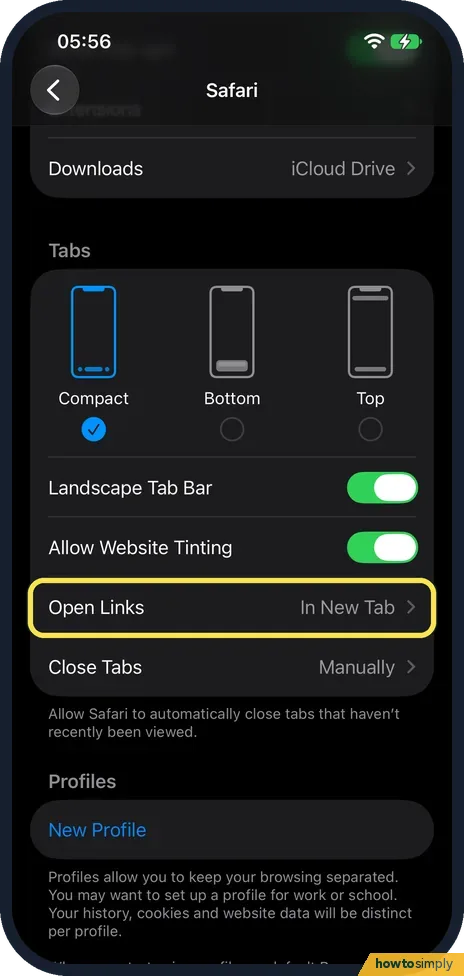
Scroll to Tabs and tap Open Links
Open Links is in the Tabs group, just below Allow Website Tinting and above Close Tabs. The row shows the current choice at the right, here In New Tab.
- 4
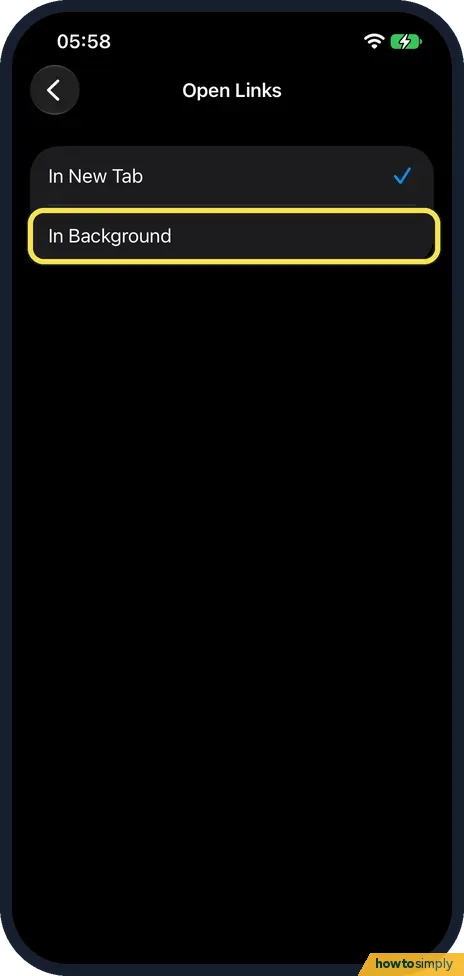
Tap In Background
The tick moves to your choice. Ours was on In New Tab, so the picture shows the screen just before you tap In Background.
If you do not see this option
- Your iPhone runs iOS 17 or earlier. Safari is in the main Settings list itself, not under Apps.
- Search for it. Open Settings, tap the search field at the bottom and type Open Links. Apple notes that the sections in Settings depend on the iPhone model. Source: Find settings on iPhone
If this does not work
- A plain tap still opens the link in the same tab. This setting applies to links you send to a new tab: tap Open in New Tab after a long press on the link.
- You cannot find the new tab. Tap the tabs button to see all open tabs. The new one is there.
- Tabs pile up after a few days? Opening links in the background makes it easy to collect far more tabs than you read. The Close Tabs row, just below Open Links, lets Safari tidy up old ones for you: see how to make Safari close old tabs automatically.
- The background tab looks blank at first? A tab opened behind the current page may still be loading when you switch to it, especially on a slow connection. Give it a moment before you assume the link is broken.
Good to know
For a new tab in Safari, tap Open in New Tab after a long press on the link.
To undo it, return to Settings, Apps, Safari, Open Links and choose your previous option (ours was In New Tab).
About this guide
When you open a link in a new tab, Safari jumps to that tab at once. If you are reading an article and want to collect several links for later, that pulls you away each time. Apple's user guide names the setting that keeps you on the current page.
- Device
- iPhone
- Shown on
- iOS 27.0.1 (iPhone 17e)
- App
- Settings
- Path
- Settings › Apps › Safari › Open Links › In Background
- Real screenshots
- 4 of 4 steps
- Checked
- October 2026
- Sources
- 1 official, linked below
The screenshots are our own, taken on an iPhone 17e running iOS 27.0.1, in dark mode.
What changed: the screenshots are now our own iPhone 17e on iOS 27.0.1, dark mode, and the wording is checked against those screens.
Sources
Links checked October 2026. Menus and features can change with updates.Did this guide work for you?
Sorry about that. What happened?
Get new guides by email
Our newest guides, sent to your inbox. Free, and you can unsubscribe in one click.
We'll email you to confirm. How we use your email
Follow howtosimply on Facebook
We share our new guides on our Facebook page, so the next fix turns up in your feed.
Follow on Facebook