How to move the Safari address bar on an iPhone
- Shown on
- iPhone 17e
- Software
- iOS 27.0.1More iOS 27 guides
- Checked
- October 2026
- Real screenshots
- 5 of 5 steps
- Where it is
- Settings › Apps › Safari › Tabs: Compact › Bottom or Top
Quick answer
Open Settings, tap Apps, then Safari, and scroll to Tabs. Choose Compact, Bottom or Top. Top puts the address bar at the top of the screen, as in older versions. Bottom and Compact keep it at the bottom, within reach of your thumb.
Steps
- 1
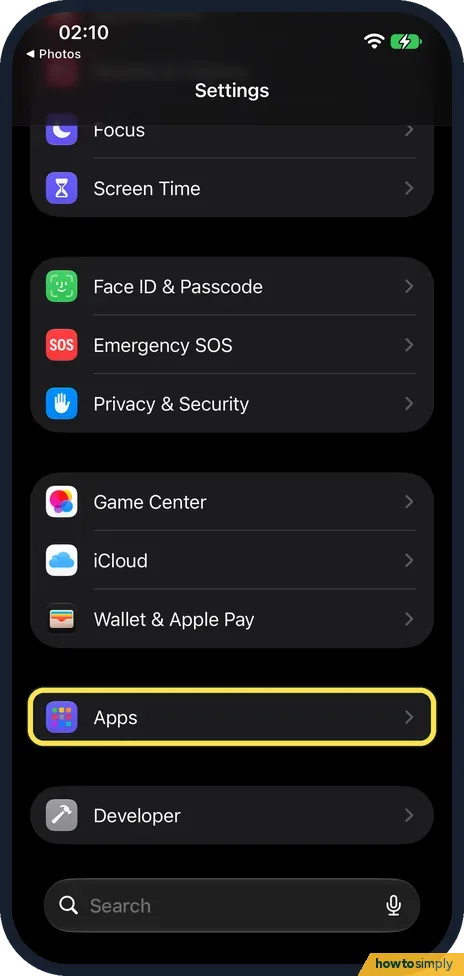
Open Settings and tap Apps
Apps is near the bottom of the main Settings list.
- 2
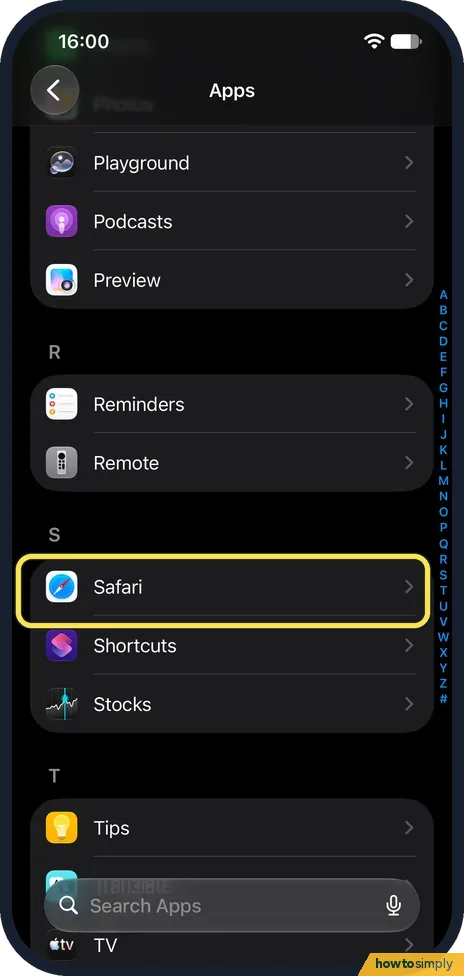
Tap Safari
The apps are in alphabetical order, so Safari is under S.
- 3
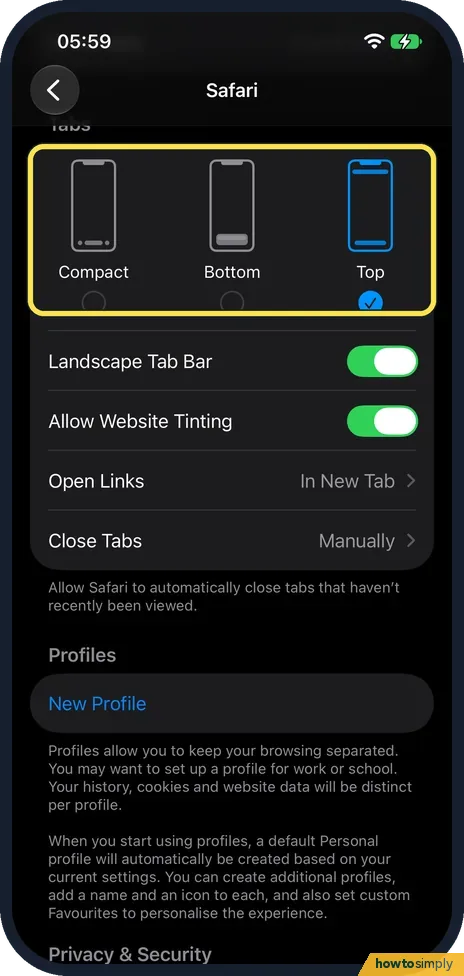
Scroll to Tabs and choose a layout
Three small phone pictures show where the bar goes: Compact, Bottom and Top. Tap one. The tick shows the active layout. Ours was on Compact; the picture shows ours after we tapped Top.
- 4
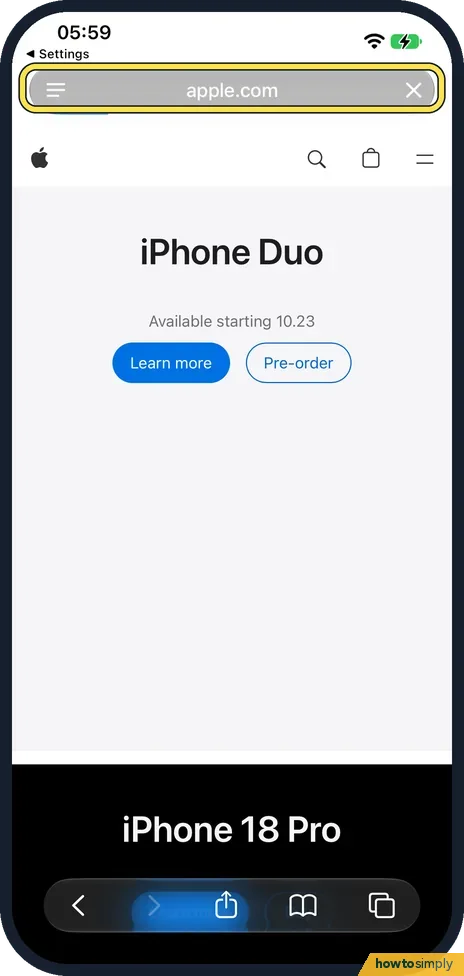
Open Safari to see the change
With Top, the address bar sits at the top of the screen, above the page. Ours showed apple.com there.
- 5
Decide how links open and when tabs close
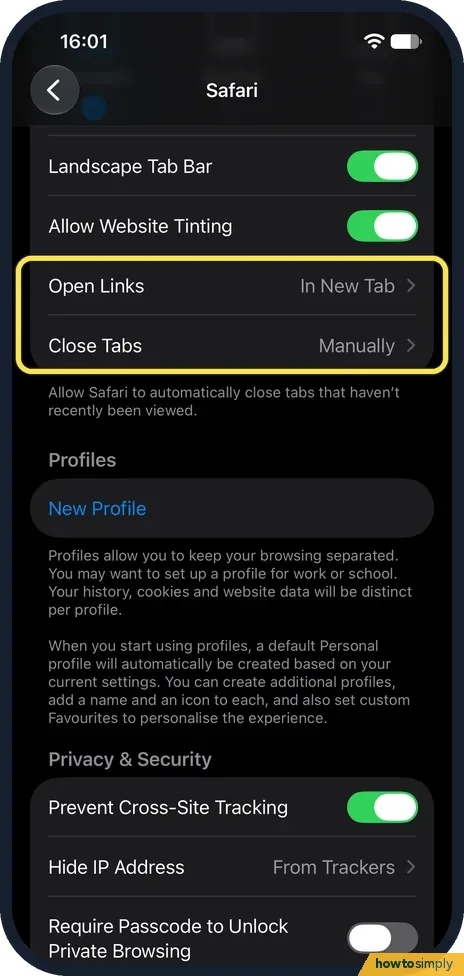
In the same group, Open Links chooses between a new tab and the background. Close Tabs is set to Manually at first, as on ours; Safari can also close tabs that you have not viewed recently by itself.
If you do not see this option
- Your iPhone runs iOS 18 or earlier. There the choice is between Tab Bar and Single Tab, in the same Tabs group. Source: Change the layout in Safari on iPhone (iOS 18)
- Your iPhone runs iOS 17 or earlier. Safari is in the main Settings list itself, not under Apps.
If this does not work
- The tabs look different when the iPhone is sideways. Landscape Tab Bar, on on ours, shows your open tabs as a row when you hold the iPhone sideways.
- The bar changes colour. Allow Website Tinting, on on ours, lets the bar take on the colour of the website you are viewing.
- Compact is missing from the choices? Apple notes that Compact is not available on iPhone Duo. There, choose Bottom or Top.
- The bar disappeared from a page? The page menu has a Hide Toolbar option. Apple says a tap at the bottom of the screen brings the bar back. This hides it for the page you are on and does not change your layout setting.
Good to know
Open Links, in the same group, decides where new tabs open: how to open Safari links in the background on an iPhone.
The change applies straight away, and you can switch back at any time from the same Tabs group. The page menu, on the left of the address bar, has a Customize Menu option, where Apple lets you add or remove Page and Tab Actions.
About this guide
Looking for the address bar at the top after an update? Safari can show a compact bar below webpages instead, and on our iPhone 17e with iOS 27.0.1 Compact was ticked. One setting puts the bar back at the top, or gives you a full bar at the bottom. It only moves the bar; your tabs and bookmarks stay as they are.
- Device
- iPhone
- Shown on
- iOS 27.0.1 (iPhone 17e)
- App
- Settings
- Path
- Settings › Apps › Safari › Tabs: Compact › Bottom or Top
- Real screenshots
- 5 of 5 steps
- What we did
- Performed: we made the change on our device and show the result
- Checked
- October 2026
- Sources
- 3 official, linked below
The screenshots are our own, taken on an iPhone 17e running iOS 27.0.1, in dark mode.
What changed: the screenshots are now our own iPhone 17e on iOS 27.0.1, dark mode, and the wording is checked against those screens.
Sources
Links checked October 2026. Menus and features can change with updates.Did this guide work for you?
Sorry about that. What happened?
Get new guides by email
Our newest guides, sent to your inbox. Free, and you can unsubscribe in one click.
We'll email you to confirm. How we use your email
Follow howtosimply on Facebook
We share our new guides on our Facebook page, so the next fix turns up in your feed.
Follow on Facebook