How to turn on call waiting and call forwarding on a Samsung Galaxy
- Shown on
- Galaxy A57 5GSM-A576B
- Software
- One UI 8.5Android 16
- Checked
- October 2026
- Real screenshots
- 4 of 4 steps
Quick answer
Open the Phone app, tap the three dots, Settings, Supplementary services. Turn on Call waiting to hear a second call during a call. Tap Call forwarding to send calls to another number always, when busy, when unanswered or when unreachable.
Steps
- 1
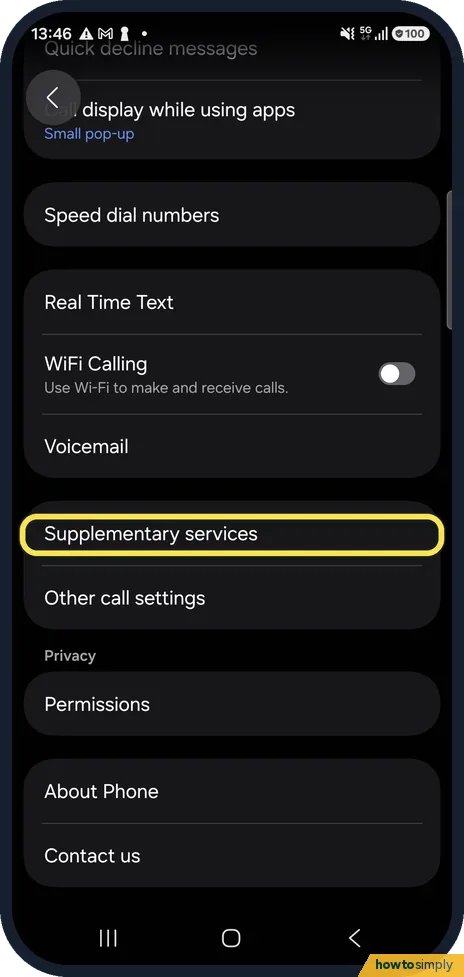
Open Supplementary services
In the Phone app, tap the three dots at the top right, Settings and Supplementary services.
- 2
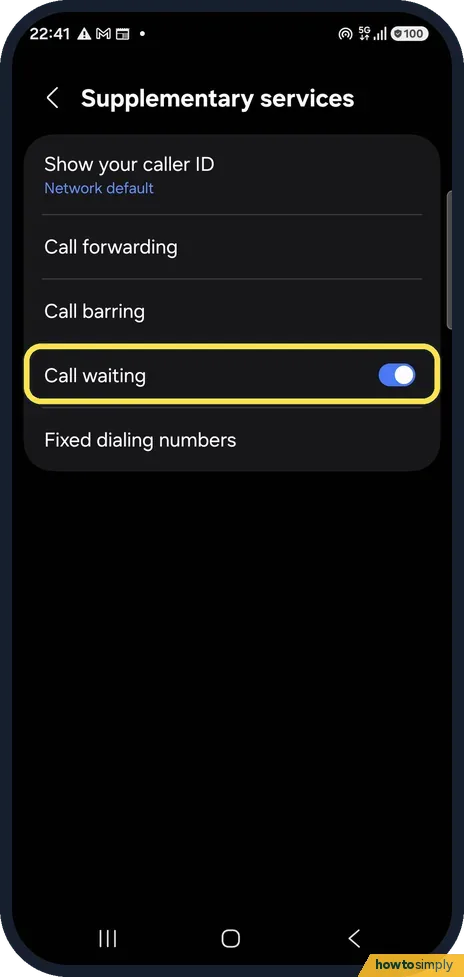
Turn on Call waiting
Call waiting is on on ours. With it on, you hear a beep when someone else calls while you are on the phone.
- 3
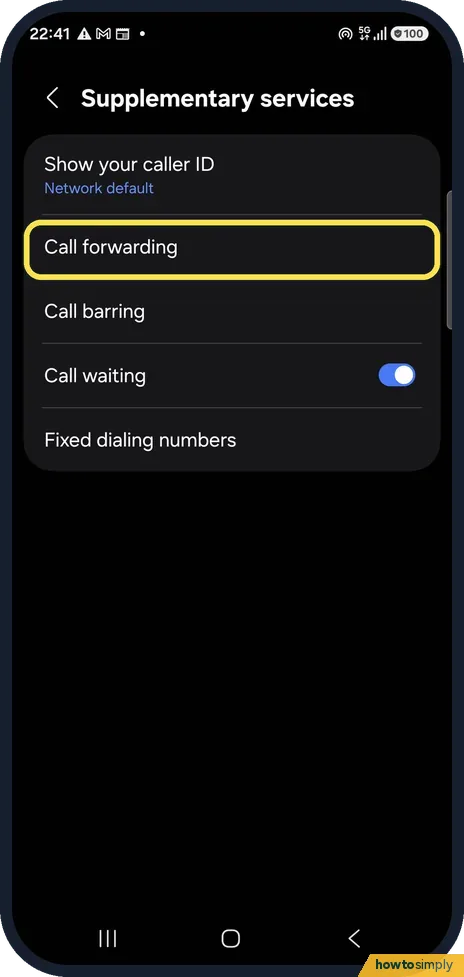
Open Call forwarding
Tap Call forwarding.
- 4
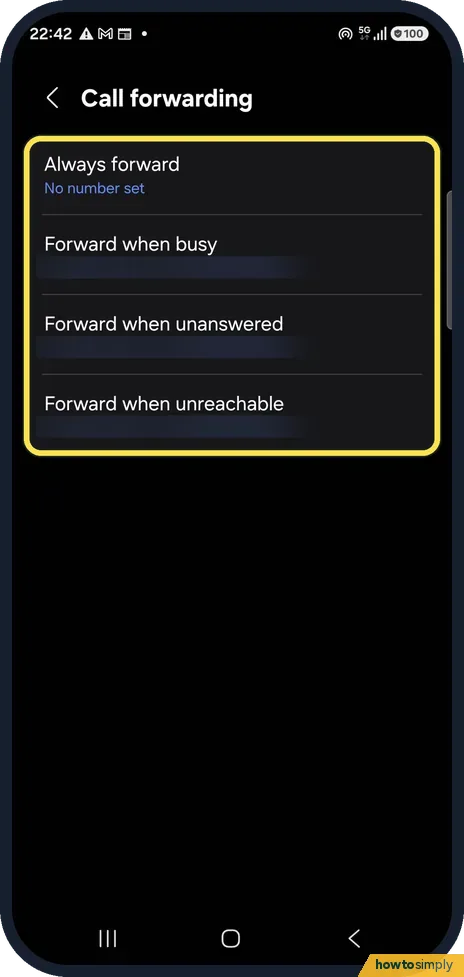
Choose when to forward
Always forward, Forward when busy, Forward when unanswered and Forward when unreachable can each have a number. Our carrier pre-sets the last three to its mailbox; we blurred the number and changed nothing. Tap one, enter the number and tap Turn on.
If you do not see this option
- There is no Supplementary services Samsung's Latin American guide calls the same menu Complementary services, in the same place under the Phone app's Settings. Source: How to enable or disable the call forwarding feature in your Samsung Galaxy smartphone
If this does not work
- An error appears when you tap Turn on? Samsung says availability of forwarding and call waiting may vary by carrier and phone model. If it still does not work, contact your carrier directly.
- Forwarding works but callers hear a message? Check the number you entered.
- No beep for a second caller? Make sure Call waiting is on, then test with a second phone. Availability may vary by carrier, so contact your carrier if the switch is on and it still does not work.
Good to know
If calls go straight to voicemail, a forwarding rule is often the reason: why calls go straight to voicemail.
Forwarded calls can cost extra, especially abroad, so ask your carrier before you rely on a rule for a trip.
To undo forwarding, go back to Call forwarding, tap the option you set and turn it off. Samsung's Australian guide calls this button Disable. Call waiting is controlled by the switch next to Call waiting.
Availability may vary by carrier, so if you change carrier, check both settings again.
About this guide
Say you are on hold with your broadband provider for what feels like a week, and a friend keeps ringing without you ever knowing. That is the job of call waiting, and call forwarding looks after the calls you cannot take at all. Samsung says whether you have it depends on your network and phone model.
- Device
- Android
- Shown on
- Samsung Galaxy A57 5G (SM-A576B), One UI 8.5, Android 16
- App
- Settings
- Real screenshots
- 4 of 4 steps
- What we did
- Observed: looked at each screen, changed nothing
- Our phone
- Shown on Galaxy A57, One UI 8.5
- Checked
- October 2026
- Sources
- 4 official, linked below
Sources
- Samsung Latin: How to enable or disable the call forwarding feature in your Samsung Galaxy smartphone
- Samsung US: Calling features on your Galaxy phone
- Samsung Latin: How to enable or disable the call waiting feature in your Samsung smartphone
- Samsung AU: How do I enable Forward Calling on my Samsung Phone?
Did this guide work for you?
Sorry about that. What happened?
Get new guides by email
Our newest guides, sent to your inbox. Free, and you can unsubscribe in one click.
We'll email you to confirm. How we use your email
Follow howtosimply on Facebook
We share our new guides on our Facebook page, so the next fix turns up in your feed.
Follow on Facebook