How to turn off smart features in the Gmail app on Android
- Shown on
- Galaxy A57 5GSM-A576B
- Software
- One UI 8.5Android 16
- Checked
- October 2026
- Real screenshots
- 3 of 3 steps
- Where it is
- Gmail › Settings
Quick answer
In Gmail open Settings, tap your account and untick Smart features. Then tap Google Workspace smart features and untick the two boxes there. Smart Compose, Smart Reply and package tracking stop working when these are off.
Steps
- 1
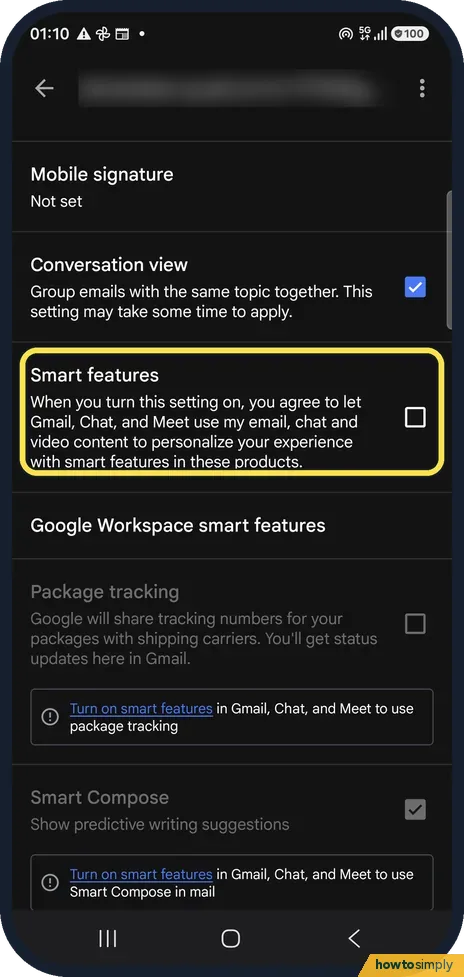
Find Smart features
Gmail, menu, Settings, tap your account and scroll to General. Smart features has a tick box; ours was off.
- 2
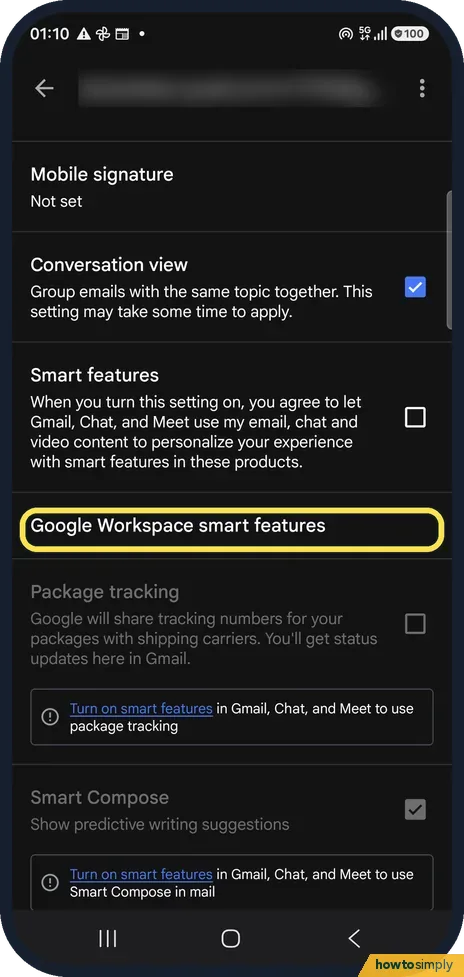
Open Google Workspace smart features
The row below opens the second set of switches.
- 3
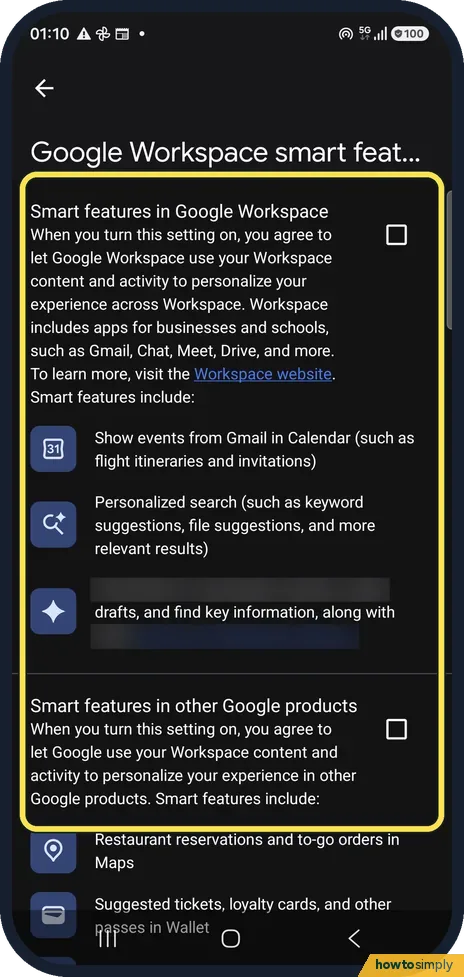
Untick both boxes
Smart features in Google Workspace covers Gmail, Chat, Meet and Drive; Smart features in other Google products covers things like Maps and Wallet. Each lists examples of what stops.
If you do not see this option
- Your boxes are already unticked Google says smart feature settings are off by default for people who live in the European Economic Area, so there may be nothing to turn off. Ours were off too. Source: Smart features and personalisation in Gmail, Chat and Meet
- You want to change Calendar, Drive or Meet Google's table marks the Workspace settings in Calendar, Chat, Drive, Meet and Voice as web-browser only. In the Android app, change them from Gmail's own settings as shown above. Source: Smart features and personalisation in Gmail, Chat and Meet
If this does not work
- Smart features are still on in the app Google says not every change you make on a computer carries over to the mobile app. Check the setting in the Gmail app itself, under Settings and your account.
- Inbox tabs disappeared? Nothing is broken; that is one of the listed effects. Google says that with smart features in Gmail, Chat and Meet off, automatic email categorisation into Primary, Social and Promotions stops.
Good to know
With smart features off, Smart Compose and Smart Reply appear greyed out with a link to turn smart features on, as on our phone, a polite little hint that Gmail would like them back.
The settings belong to your Google Account, but Google notes that some changes made on a computer don't show in the mobile app, so check both if you use Gmail on a computer.
Google says the change applies across all devices and apps where you are signed in to that account. Turning off smart features in Google Workspace also stops showing events from your Gmail in Calendar, personalised search in products such as Drive, and features that summarise content or help with drafting. The other Google products setting covers Maps restaurant reservations and Wallet's suggested tickets, passes and loyalty cards. To turn anything back on, tick the box again; the features return. To tidy your inbox by hand instead, see making Gmail filters from Android.
About this guide
Not everyone likes the idea of their inbox helping to finish their sentences. Smart features let Google use your mail to personalise things like Smart Compose and package tracking. Turning them off is a privacy choice, and there is no wrong answer here. Our Gmail account is a real one, so addresses, senders and subjects are blurred; the only mail we touched was a test message we sent to ourselves. We did not change ours.
- Device
- Android
- Shown on
- Samsung Galaxy A57 5G (SM-A576B), One UI 8.5, Android 16
- App
- Gmail
- Path
- Gmail › Settings
- Real screenshots
- 3 of 3 steps
- Checked
- October 2026
- Sources
- 1 official, linked below
The screenshots are from the Gmail app on a Samsung Galaxy A57 5G with Android 16 and One UI 8.5, in dark mode. The app looks the same on other Android phones; only the phone's own settings screens differ by brand.
Sources
Links checked October 2026. Menus and features can change with updates.Did this guide work for you?
Sorry about that. What happened?
Get new guides by email
Our newest guides, sent to your inbox. Free, and you can unsubscribe in one click.
We'll email you to confirm. How we use your email
Follow howtosimply on Facebook
We share our new guides on our Facebook page, so the next fix turns up in your feed.
Follow on Facebook