Gmail storage full on Android: how to find big emails
- Shown on
- Pixel 10a (Android 17) and Galaxy A57 5G (One UI 8.5)
- Checked
- November 2026
- Real screenshots
- 3 of 4 steps
Quick answer
In the Gmail app search for larger:10M to list emails bigger than 10 MB. Open the ones you do not need, delete them, then empty the Trash. Your storage is shared with Google Drive and Google Photos, so check those too.
Watch these steps
Video: on our Pixel 10a (Android 17) we type larger:10M into the Gmail search box and the list of large emails appears. Our inbox is blurred. No sound.
Steps
- 1
Search by size
Type larger: and a size into the Gmail search box, for example larger:10M for mails over 10 MB. On our Pixel it listed a handful of mails, each with big attachments. The list is blurred because it is our real inbox.

- 2
Delete what you do not need
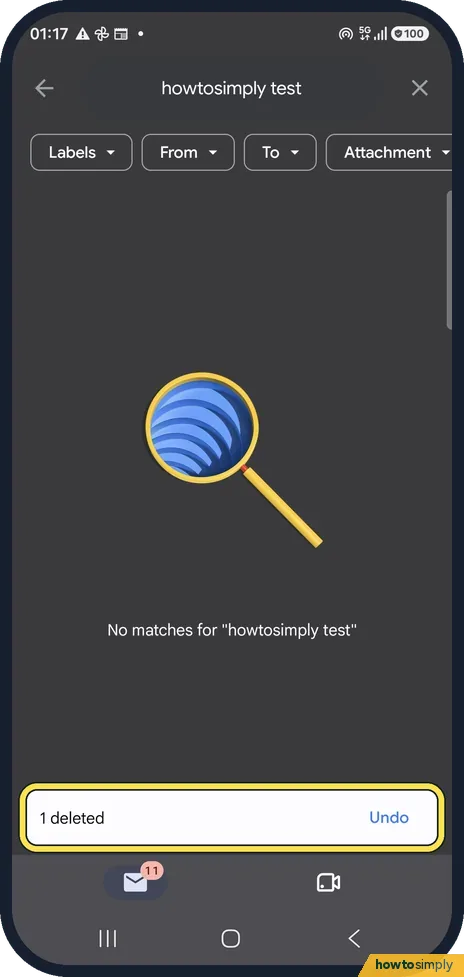
Open a mail you do not need and tap the bin at the top of the mail. A bar at the bottom confirms the delete and offers Undo. In our picture it says 1 deleted: we deleted our test mail from the search results, so the list behind it is now empty and says No matches.
- 3
Empty the Trash
Deleted mail still counts against your storage for 30 days. Open the menu at the top left, tap Trash and then Empty trash now at the top. We did not empty ours.
- 4
Check what else uses the space
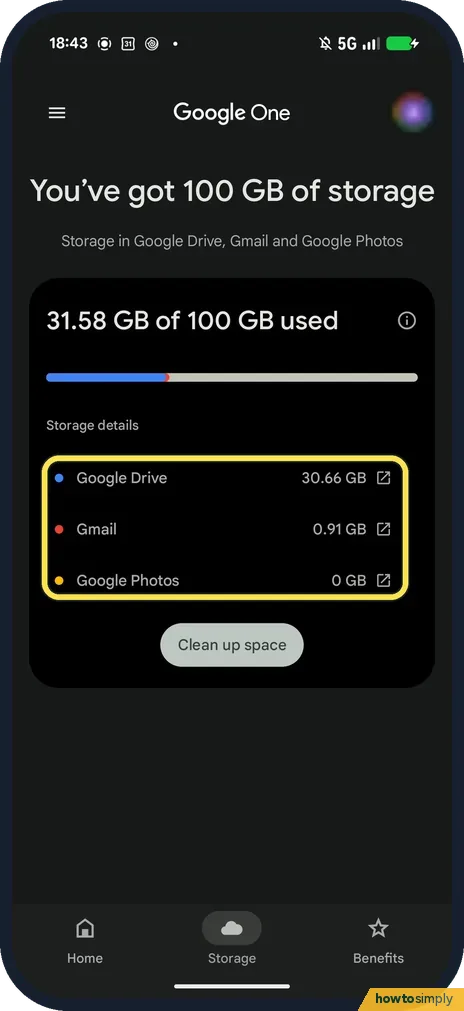
Storage is shared with Google Drive and Google Photos, so check which one is full before you delete mail. In the Google One app, open the Storage tab. On our Pixel, Google Drive used 30.66 GB and Gmail only 0.91 GB, so deleting mail would barely help that account.
Where we checked these steps
- Pixel 10a, Android 17
- Galaxy A57 5G, One UI 8.5 (Android 16)
We have not checked other phones or older versions. If a menu looks different on yours, the notes under each step and the fixes further down cover the differences we found.
If you do not see this option
- There is no Empty trash now button Google puts Empty trash now at the top of the Trash itself. Open Trash first. Source: Delete or recover Gmail messages
- Your account is from work or school Google says some quota changes affect certain Google Workspace and G Suite for Education plans. Source: How your Google storage works
If this does not work
- Storage is still full after deleting Google counts the Spam and Trash folders against your storage, so empty both. Files in Google Drive and photos in Google Photos share the same space.
- Mail still does not arrive Google says that while you are over your storage limit, sending and receiving email can be affected. Get back under the limit first.
- The storage figure does not drop? Google says deleting many files can take 48 to 72 hours to show in your storage totals. The counter is simply slower than your delete button. Check again after a couple of days.
- Most of the space is not Gmail? Google says WhatsApp backups on Android, Android backup data, Meet recordings and Drive files all use the same 15 GB. Check those before deleting more mail, so you are not clearing out your inbox while the real space hog sits somewhere else.
Good to know
Other useful searches: has:attachment older_than:1y for old attachments, or larger:5M in:sent for big mails you sent.
Mail still not arriving after you free space? Gmail not getting new emails on Android.
Google says each account gets up to 15 GB shared across Gmail, Google Drive and Google Photos. Over the limit, you can still sign in, but on your Drive files you can do little beyond download, delete and Takeout, photo backup stops, and email may not send or arrive properly. If an account stays over its limit for two years or more, Google says all its content may be deleted, after notifying you at least three months before. Freeing space or buying more storage avoids this.
About this guide
A full Google storage is one of those problems you only notice when the email you are waiting for never turns up. Once your Google storage fills up, Gmail may struggle to send and receive email. Gmail messages and attachments count towards your storage. Our Gmail account is a real one, so addresses, senders and subjects are blurred; the only mail we touched was a test message we sent to ourselves.
The size search and Google One pictures are from our Google Pixel 10a with Android 17, taken on 18 November 2026.
- Device
- Android
- Shown on
- Google Pixel 10a, Android 17, Samsung Galaxy A57 5G (SM-A576B), One UI 8.5, Android 16
- App
- Gmail
- Real screenshots
- 3 of 4 steps
- Checked
- November 2026
- Sources
- 3 official, linked below
The screenshots are from the Gmail app on a Samsung Galaxy A57 5G with Android 16 and One UI 8.5, in dark mode. The app looks the same on other Android phones; only the phone's own settings screens differ by brand.
Sources
Links checked October 2026. Menus and features can change with updates.Did this guide work for you?
Sorry about that. What happened?
Get new guides by email
Our newest guides, sent to your inbox. Free, and you can unsubscribe in one click.
We'll email you to confirm. How we use your email
Follow howtosimply on Facebook
We share our new guides on our Facebook page, so the next fix turns up in your feed.
Follow on Facebook